 最后编辑:2021-05-18
- 资源介绍
- 更新记录
- 安装教程
若有个人部署运行问题,点击右侧客服按钮咨询站长
项目介绍
List and Table Elements of HTML
The George Washington University
Computer Science 1023
Professor Brenner (nbrenner@gwu.edu)
The HTML tags for arranging items vertically and horizontally are call the List and Table elements. Full description of them is given in the www.w3schools.com website. In brief, the list tags arrange items vertically, and mark them off with a bullet or number. The table tags arrange items both vertically and horizontally, with optional cell borders. Note that a vertical table with only one column is similar to a list without bullet or number markers.
Lists must be enclosed in tags:
<list> … [One or more list items go here] </list>
List items must be enclosed in tags:
<li> … [Any HTML code may go here: text or image or whatever]
</li>
Lists can be unordered (marked by bullets) or ordered (numbered or lettered in sequence). The former lists are marked by <list></list> or by <ul></ul>, while the latter are delimited by <ol></ol>. The list item tag and format is the same for both kinds of list. Lists may be nested, if desired.
Delimiting the beginning and end of a rectangular table:
<table bgcolor=”EAF8FF” width=”75%” border=1 cellspacing=2 cellpadding=10>
… [One or more table rows go here]
</table>
All of the attributes shown inside the <table> tag are optional. But it is strongly recommended that a border of 1 be drawn initially so that the data cells will stand out clearly. It can be set to 0 once the table looks right.
Delimiting the beginning and end of a table row:
<tr> … [One or more datacells go here] </tr>
Delimiting the beginning and end of a single datacell:
<td bgcolor=”white” align=”center” colspan=”3” rowspan=”2”>
… [Any HTML code may go here: text or image or whatever]
</td>
In practice, the closing tags for list item (</li>), table row (</tr>) and table datacell (</td>) are not needed, since opening the next one will close the previous one. However, the closing tags for a list (</list>, </ul>, or </ol>) and for a table (</table>) are definitely required.
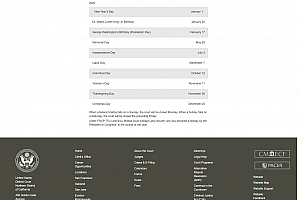
Laboratory: Make a fair copy of the page
https://www.cand.uscourts.gov/calendars/court-holidays/
or, optionally, for a more advanced page,
https://www.opm.gov/policy-data-oversight/pay-leave/federal-holidays/#url=2020
适用场景:
运行截图

关注【程序代做 源码分享】公众号获取更多免费源码!!!

猜你喜欢
-
登录和后台系统界面html
2021-07-31 -
html前端4页面早教课程网页源码
2021-05-12 -
html旅游网页前后台
2021-05-20 -
html电商网页10页面
2021-05-14 -
旅游网页6页面,湘西+课程设计报告+毕业论文
2021-09-07 -
环保5页面
2021-05-18 -
html前端6个页面个人简历
2021-05-14 -
军事推荐系统页面
2021-05-18 -
网页简易四则运算器
2021-05-18 -
html5飞机大战游戏源码
2021-05-02
-
旅游网页6页面,广安市前锋区+课程设计报告
2021-09-07 -
SSM停车场管理系统、
2021-10-04 -
html前端飞机大战
2021-09-07 -
网页集合
2021-09-08 -
html前端个人介绍网页源码
2021-05-12 -
html前端校园介绍网页10多个页面
2021-05-14 -
商城前端html源码
2021-07-08 -
简单学生北京介绍页面
2021-05-18 -
Forms and Input Elements of HTML The George Washington University Computer Science 1023 Professor Brenner (nbrenner@gwu.edu)
2021-05-18 -
html页面旅游网页前后台页面
2021-05-28
猜你在找
99源码网 » List and Table Elements of HTML The George Washington University Computer Science 1023 Professor Brenner (nbrenner@gwu.edu)
常见问题FAQ
- 免费下载或者VIP会员专享资源能否直接商用?
- 本站所有资源版权均属于原作者所有,这里所提供资源均只能用于参考学习用,请勿直接商用。若由于商用引起版权纠纷,一切责任均由使用者承担。更多说明请参考 VIP介绍。
- 提示下载完但解压或打开不了?
- 找不到素材资源介绍文章里的示例图片?
- 99源码网

- 2021-05-18Hi,初次和大家见面了,请多关照!